A customer calls a carpet-cleaning business. The team needs to book a visit, decide where to clean each carpet, confirm the price, collect payment and complete the handover.
The company has a standard operating procedure, or SOP. But an employee still asks: “Should we collect this carpet?” or “Can we deliver it before payment arrives?”
The owner may see this as a failure to follow instructions. First, check whether the instructions make those decisions clear and easy to find.
This guide focuses on three common problems in the document itself, with a small example you can adapt.
See the carpet-cleaning example
Two matching documents: a one-page visual guide for quick reference and the full SOP for responsibilities, checks and exceptions.
Free. No sign-up. PDFs for reading or printing. Get the editable SOP text.
Three problems that make an SOP difficult to follow
1. It is long, and the needed instruction is hard to find
An employee handling an order needs the next action. If it is buried among background explanations, they must search through the document while the customer waits.
Length matters when it makes the relevant instruction difficult to locate. Keep necessary detail, but organize it around the task: booking, inspection, cleaning, payment and return.
Use numbered steps, descriptive headings and visible decision points. Put supporting explanations beside the relevant step or in a linked reference. The EPA recommends concise, sequential instructions and recognizes diagrams as a way to summarize steps. 1
2. The instruction leaves too much to interpretation
“Check the carpet and arrange cleaning” does not say who checks it, what to check or what must be agreed before work begins.
A clearer instruction is:
Technician: Measure each carpet, record its condition and assign an item number. Agree the price, cleaning location, timing and payment terms with the customer. Save their confirmation before cleaning or collection.
For each important step, use this structure:
- Owner: who is responsible.
- Action: what they must do.
- Required result: what confirms completion.
- If it fails: whether to stop, hold, correct or escalate the work.
Words such as “properly,” “as needed” and “check everything” need an explanation when employees could interpret them differently.
3. It explains the usual path but misses the decision points
An employee may understand every routine step and still be unsure what to do when payment is pending, a label is missing or the customer is absent.
Write those responses where the decision occurs:
- Payment pending: Customer Service holds workshop dispatch and asks the manager to resolve it.
- Missing label: The Workshop holds the affected carpet and notifies the manager before processing.
- Customer absent: The Delivery Team keeps the carpets and rebooks the handover.
“Contact the manager” should also say what happens to the job while it waits. A held job needs a reason, a named owner, a next action and a follow-up date.
Check whether wording is the main problem
Clearer instructions cannot provide missing system access, equipment, authority or practical skill. If an employee understands the step but cannot perform it, fix that operational barrier. This quick check keeps the owner from repeatedly rewriting an instruction that is already understood.
Use a written SOP with a visual guide
For a process with clear branches, a useful arrangement is:
- Standard Operating Procedure: the full instructions, responsibilities, checks, records and exception handling.
- Visual Guide: a quick view of the sequence, branches and important stop points, linked to the full SOP.
Give both the same step numbers and version. Put the guide where employees start the task, with the full instructions easy to open.
Choose visuals that explain an action or decision: a flowchart for routes, a screenshot for a confusing field, or a photo showing an acceptable result. HSE recognizes diagrams, checklists and decision aids as procedure formats and recommends choosing the detail to suit the user and task. 2
Large companies use visual instructions too. Boeing describes projecting work instructions directly onto 777X wings during assembly. That is one example of putting guidance where work happens; a small business can start with a clear printed guide or a link beside its order form. 3
Keep enough detail for someone trained in the work to act correctly. A one-page guide supports that knowledge; its layout alone cannot establish that the process works.
Example: handling carpet-cleaning orders
ClearCare Carpet Cleaning is fictional. Its sample rules illustrate how to write decisions clearly. The 4 m² limit and payment terms are company rules invented for this example; adapt them to your equipment, services and customers. Cleaning methods belong in separate instructions for each material.
The process starts with one job number. At inspection, the technician assigns an item number to each carpet and confirms the price, route and timing with the customer.
The two routes are:
- Home cleaning: a suitable carpet up to 4 m² is cleaned at the customer's home. The technician checks the agreed result, invoices that portion, confirms payment and gives a receipt. Customer Service records completion.
- Workshop cleaning: a suitable removable carpet over 4 m² is labelled and collected. The workshop cleans and fully dries it; a supervisor records the quality check. Customer Service confirms payment before dispatch. The delivery team matches the items and records the customer's handover confirmation.
Fixed carpets, delicate or unknown materials, and unsuitable conditions require a manager-agreed alternative before proceeding.
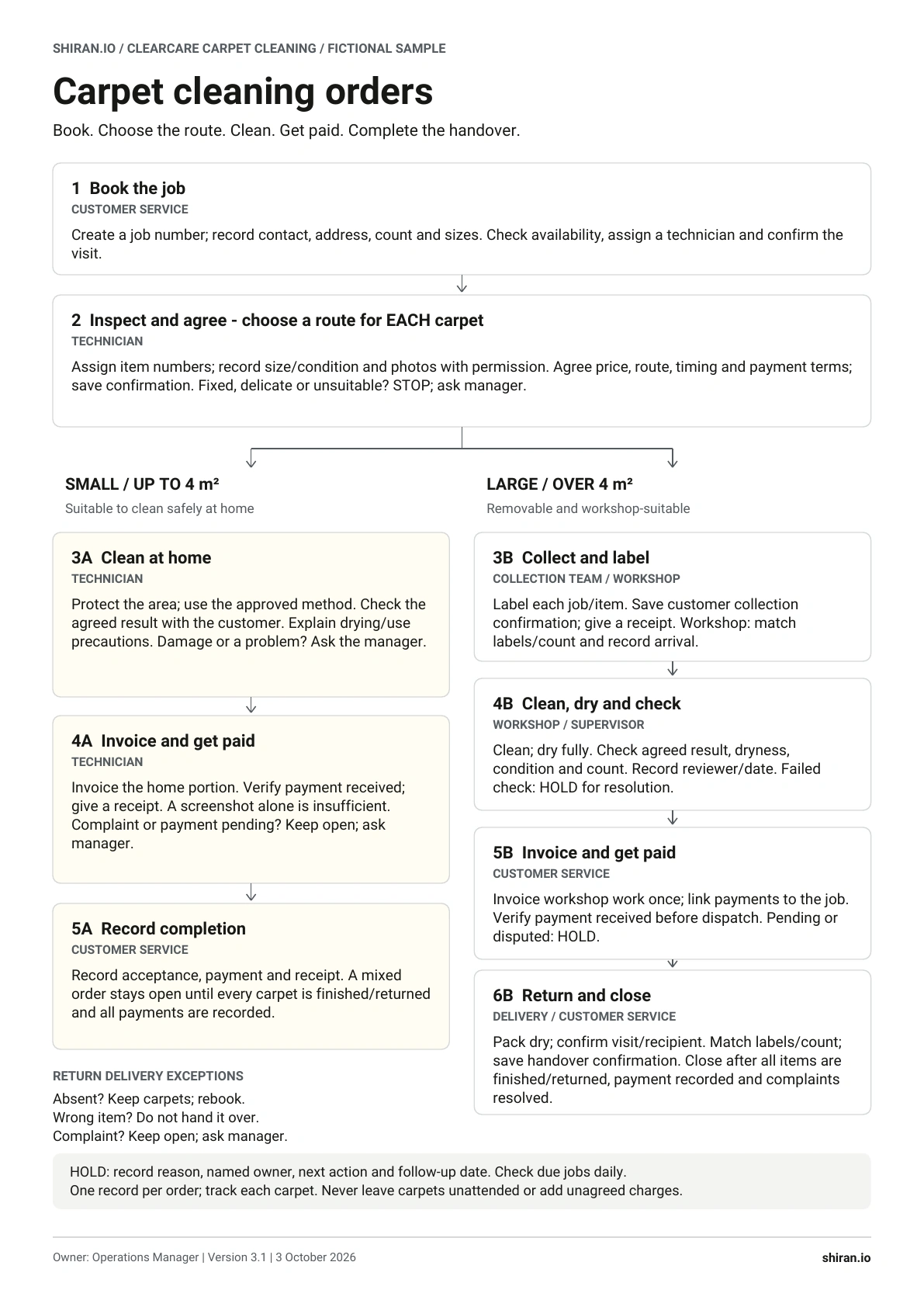
An order can contain both small and large carpets. Track each item and invoice each service once. Close the whole job only when all carpets are finished or returned, payments are recorded and complaints are resolved.
These details make the example usable beyond its main flow: employees can see who owns a step, when to stop, and what counts as finished.
Test it with the people who will use it
Before introducing the documents, ask a trained employee who did not write them to try three cases: a home-cleaning order, a workshop order and a mixed order. Include an exception, such as pending payment or an absent recipient.
Watch whether they can find the correct route, explain the next action and identify when to hold the job. Note where they need help. Fix the missing instruction, then repeat the affected case. The EPA specifically recommends testing drafts with someone other than the original author. 1
Before approving the SOP, ask:
- Can an employee find the needed step quickly?
- Is responsibility clear?
- Is the required result defined?
- Are the common exceptions covered?
- Can someone other than the writer follow it without an extra explanation?
Introduce the process through practice, keep its approved copies together and give employees a way to report unclear steps. Track questions, missed checks and rework to see whether the changes help.
Start with one recurring task that generates questions. Make its actions and decisions explicit, create a quick guide if useful, and test both during the work.
Sources
The recommendations apply official procedure guidance to a small-business example. ClearCare is a fictional example. Adapt the rules to your business and test the procedure with employees before using it.
- US EPA (2007). Guidance for Preparing Standard Operating Procedures, QA/G-6. Sections 1.4, 2.2 and 3 cover clear writing, testing drafts and procedure format.
- UK HSE. Human factors: Procedures. Guidance on format, appropriate detail, user involvement and competence.
- Boeing. Strengthening Safety & Quality. “Projected instructions improve precision in 777X wing assembly,” 10 October 2025.